 Matla
Matlaسَلَٰمٌ هِىَ حَتَّىٰ مَطْلَعِ ٱلْفَجْرِal-Qadr 97:5
Matla مطلعPrayer times, adhan and a Fajr alarm
For iPhone and Apple Watch. The app is in Arabic.
Times calculated with the Egyptian General Authority of Survey method, an adhan that arrives on time, a real Fajr alarm, and the whole mushaf offline. Completely free, with no ads, no accounts and no cross-app tracking.

In testing on TestFlight now. The download link goes here on release day.
- Completely freeEvery feature is open. No subscription needed.
- No ads, no accountsNo cross-app tracking. Your location stays on your phone.
- Egyptian method by defaultFajr 19.5°, Isha 17.5°, with other methods too.
- Actually wakes youThe Fajr alarm is a system alarm, not a notification that can be muted.
What it does
Everything a prayer day needs, and nothing it doesn't
The full tour, with screenshots, is on the Arabic page.
Prayer times and adhan
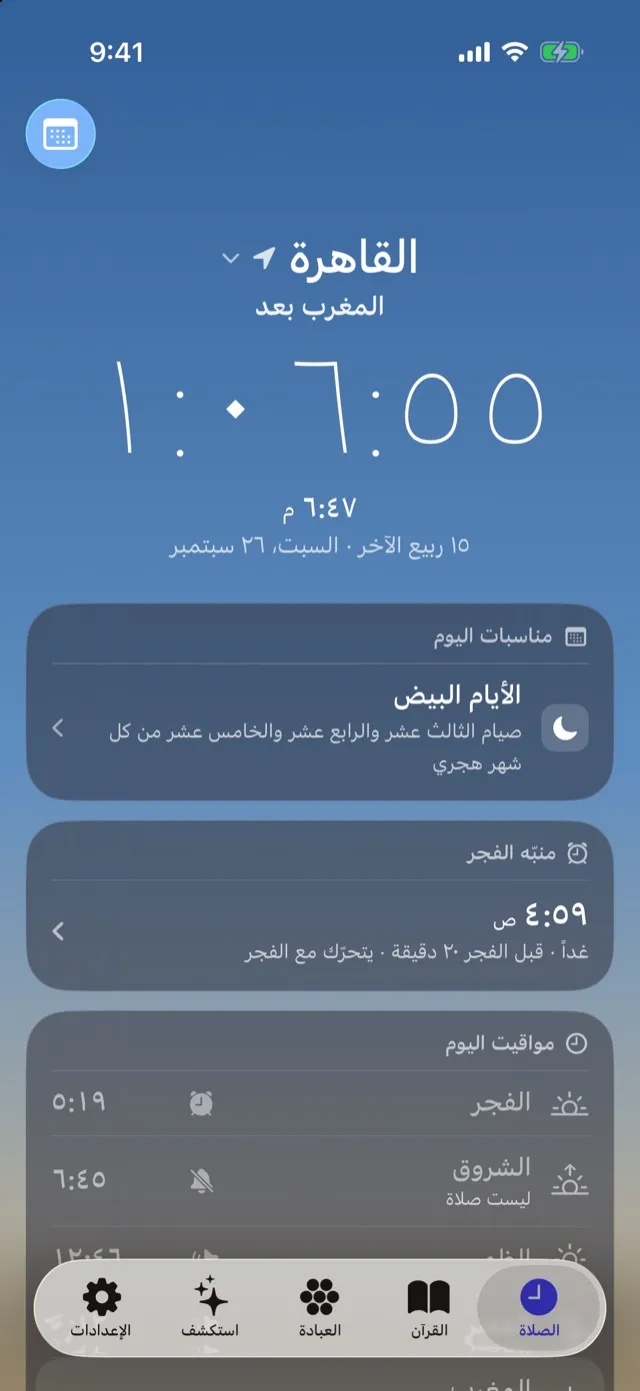
Times for your city with the Egyptian General Authority of Survey, Umm al-Qura, Muslim World League and other methods, per-prayer minute adjustments, and an adhan that arrives even when the app is closed. Adhan, a silent alert or nothing, set per prayer.
The Fajr alarm
An iOS system alarm (AlarmKit) that rings even on silent or in a Focus, with the adhan voice you choose. An optional wake-up task: say the waking dhikr, walk a few steps, or scan a code by the sink. A bedtime reminder worked back from Fajr.
The Quran
The whole mushaf in the King Fahd Complex script (1441 AH print) with tajweed colours, offline. Recitations from more than thirty reciters, with the recited ayah followed on the page, and surahs you can download for offline listening.
Athkar, and your own
Morning, evening, sleep, waking and after-prayer athkar with a counter and a source for each. Add your own dhikr and duas, which join the end of the morning or evening set. A tasbih counter and the Qibla.
The Hijri calendar
A monthly timetable, the Umm al-Qura calendar with a one- or two-day adjustment, and occasions: Friday and Surat al-Kahf, Sunnah fasts, Ramadan, Laylat al-Qadr and the two Eids, each with its sources.
Live from Makkah
Live broadcasts from al-Masjid al-Haram and al-Masjid an-Nabawi through the Saudi Broadcasting Authority's official YouTube channels, and Holy Quran Radio from Cairo.
Widgets and the Live Activity
Home Screen, Lock Screen and StandBy widgets: the next prayer, today's times, the sun's path, an ayah of the day, the Names of Allah and a day companion. An optional Live Activity counts down to the next prayer in the Dynamic Island.
Apple Watch
All of today's times on one screen, the Qibla with a compass that tells you when you're facing it, a tasbih on the Digital Crown, and complications. The watch takes your city and settings from the iPhone.
Privacy
Your location never leaves your phone
No ads, no accounts, and no tracking across apps. We collect anonymous usage and crash data to improve the app, and you can turn it off in Settings.
- No adsNot one, and no third-party advertising code.
- No accountsNo sign-up, email or phone number. Open it and it works.
- No cross-app trackingNo advertising identifier, and nothing we collect is linked to other apps or websites.
Your location is used on your phone to calculate prayer times and the Qibla, and is never sent to us or anyone else. Decline the permission and pick your city by hand; the app still works fully. What you save in Matla, from your city to bookmarks and your own athkar, stays on your device.
What we do collect: crash reports, performance measurements and anonymous usage events (which screens and features are used), through Google's Firebase, with an app-installation identifier that doesn't identify you. None of it carries your name or location. Read the full privacy policy
Thank Matla
Free, and it stays free
If Matla helps you, you can thank us with a small amount. It unlocks nothing, because everything is already open, and nothing changes for people who don't.
Purchases go through the App Store at the price shown in the app. We never see payment details or who you are.
- A one-time thank youThree amounts to choose from, paid once.
- A monthly thank youA subscription that renews each month. Cancel any time in your Apple account settings.
FAQ
Before you install
Is the app in English?
No. Matla is in Arabic only. This page is in English for phones set to English, but every screen in the app is Arabic.
What is the best prayer times app in Egypt?
The best one calculates with the Egyptian General Authority of Survey method (Fajr at 19.5°, Isha at 17.5°), delivers the adhan on time with the app closed, and doesn't interrupt you with ads. Matla is built on that: the Egyptian method by default, Time Sensitive adhan notifications, a real Fajr alarm, and no ads. It is iPhone-only for now and in Arabic only. Other well-known apps support the Egyptian method too, so choose what suits you.
Does the adhan play when the phone is on silent?
The adhan is a notification, and iOS notifications follow the silent switch: on silent you get the vibration and the banner without sound. Matla's Fajr alarm is an iOS system alarm (AlarmKit), and it rings even on silent or in a Focus. Adhan notifications are Time Sensitive, so they skip the scheduled summary and a Focus if you allow it.
Does Matla work offline?
Mostly, yes. Prayer times, the adhan, the Fajr alarm, the whole mushaf (1441 AH print), athkar, the Qibla and the calendar all work offline. Recitations need the internet except for surahs you've downloaded, and the live broadcasts and radio always need it.
Why doesn't the notification play the whole adhan?
iOS limits a notification sound to 30 seconds. Matla plays the adhan in the notification, and if you open the app it plays the adhan in full.
Which calculation methods does Matla support?
The Egyptian General Authority of Survey (the default), Umm al-Qura, the Muslim World League, the University of Islamic Sciences in Karachi, the Islamic Society of North America and others, with the Asr school and a per-prayer adjustment in minutes.
Is Matla free?
Yes, completely. No ads, no locked features and no required subscription. You can support it with a one-time or monthly amount if you like, and that unlocks nothing.
Does Matla collect my data or location?
Not your location: approximate location is enough, everything is calculated on your phone, and your location is never sent to us. There is no account, email or advertising. Matla does collect anonymous usage and crash data through Google's Firebase, without the advertising identifier, to fix crashes and improve the app, and you can turn it off in Settings.
How do I find the Qibla with my iPhone?
Open the Worship tab, then Qibla, and hold the phone flat: the pointer shows the direction and tells you when you're facing it. Compass accuracy is affected by nearby metal and magnets, so if it asks for calibration, move the phone in a figure 8. The Apple Watch app has a Qibla page too.
Does Matla's Hijri date match the date in Egypt?
Matla uses the Umm al-Qura calendar. Months in Egypt can start a day apart, based on the moon sighting, so Settings has a Hijri date adjustment of one or two days.
Is Matla on Android?
Not yet. Matla is for iPhone and Apple Watch. An Android version is designed but not built.
What does Matla need to run?
An iPhone on iOS 26.1 or later. The watch app works with a paired Apple Watch.
Support
A question, an idea, or a bug?
Write to us. We read every message, in Arabic or English. Matla needs an iPhone on iOS 26.1 or later.
zaplatform@gmail.com